-

- 04 Dec, 2021
How to include custom components in Aurelia
Every framework has its ways how to include custom components, reusable block of codes, into the page content. In Aurelia, we have three main options …

Every event is a special object used in browsers to signal that something happened to a HTML element. And JavaScript can be used to react to that fired object. Event can be fired on almost any thinkable action - pressing a key, clicking a button, tapping on a phone or signaling that the page is loaded. In addition to plenty of predefined events we can even create our own custom events and dispatch them at any time we want.
JavaScript uses two processes to handle the event - event listener and event handler. Event listener is something that is sitting on a page (or more exactly on a HTML element) and waiting for given event to happen. Event handler is block of code that will be run as a response to the event. When an event is registered by event listener, the listener will call the event handler to perform the action we defined.
The event listener can be defined in two ways:
<button onclick="doSomething()"></button>
In this first case, the onclick attribute is an event listener and doSomething() is an event handler defined as an action that should be called when we click on the button.
<button></button>
const button = document.querySelector('button');

button.addEventListener('click', doSomething());
Here we define the event listener in our js file. The ‘click’ is the event name we are listening for and the doSomething() is an event handler used as a callback in the addEventListener method. The event listener can have third optional parameter. It can be an object of additional options or a boolean value. The boolean value sets the capturing flag.
Now when we know what is an event and how to listen and react to one, we can now dive into some practical stuff.
Let’s imagine we have two div elements wrapping a button and every element has an onclick event listener registered that will show an alert window. You can try it:
Clicking on the button will show 3 alerts in this order: button, parent 2 and parent 1.
To understand what happened, we have to think about the event itself. At first, when we click on a button, the browser creates DOM event. In case of a click, it’s a PointerEvent.
The PointerEvent carries a lot of information (see the console for complete info). To pick some:
{
    bubbles: true,
    path: [button.click-listener, div.wrapper-2.click-listener, div.wrapper-1.click-listener, body, html, document, Window],
    pointerType: "mouse",
    screenX: 612,
    screenY: 360,
    target: button.click-listener,
    type: "click"
    ...
}
Note the type property that is set to ‘click’, stating that the event represents a mouse ‘click’.
After creating the event object, the browser dispatches it. The event goes through the DOM in a process called Event Propagation. And there are three phases in the event propagation process:
In the capturing phase, the event goes from root of the DOM traversing every element until it reaches the target element that triggered the event. In our example of PointerEvent (see the last js example), it goes html -> body -> div.wrapper-1 -> div.wrapper-2 -> button. On every element the event is traversing, it checks if it has registered event listener of its type and with capture flag set to true. The default value of the capture parameter in the event listener is set to false. So the event listeners does not listen to events in the capturing phase by default, it has to be set.
The event reaches the target element and runs an event listener attached to it if set. That gives us the first alert window.
In this phase the event traverse from event target back up to the DOM’s root. It is similar to the capturing phase but in reverse direction. All the listeners with ‘capture’ flag set to false (all the defaults) are called. Here we got the other two remaining alert windows.
The Event propagation in our case can be drawn as below.
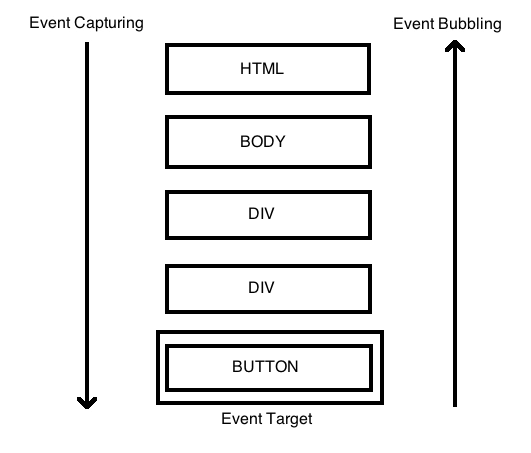
The capturing is used when we need to react to an event in the capturing phase and not in the bubbling phase. Every element will react to single event only once. In capturing phase or in the bubbling phase. Almost every time we want handle the event in bubbling phase, but there might be situations when we want to call the handler in capturing phase. For example when the bubbling phase is not supported. Events like focus and blur does not bubbles u and the only way, how to trigger a handler function, is during the capturing phase.
To catch an event on the capturing phase, we need to set the capture option to true:
element.addEventListener(..., {capture: true})
// or, just pass "true" as third parameter
element.addEventListener(..., true)
Understanding of event bubbling and capturing is essential for handling user events in JavaScript. At first, during capturing phase, the event goes from the root element down the DOM to the target element. When the target element is found, the targeting phase is initiated. At the last step, the event is bubbling back to the root element through the DOM. So capturing always propagates from root to the target element and bubbling back from target element to the root.
Every framework has its ways how to include custom components, reusable block of codes, into the page content. In Aurelia, we have three main options …

Two important tools in the TypeScript type system are type inference and type assertion. While they sound similar, they serve different purposes and …